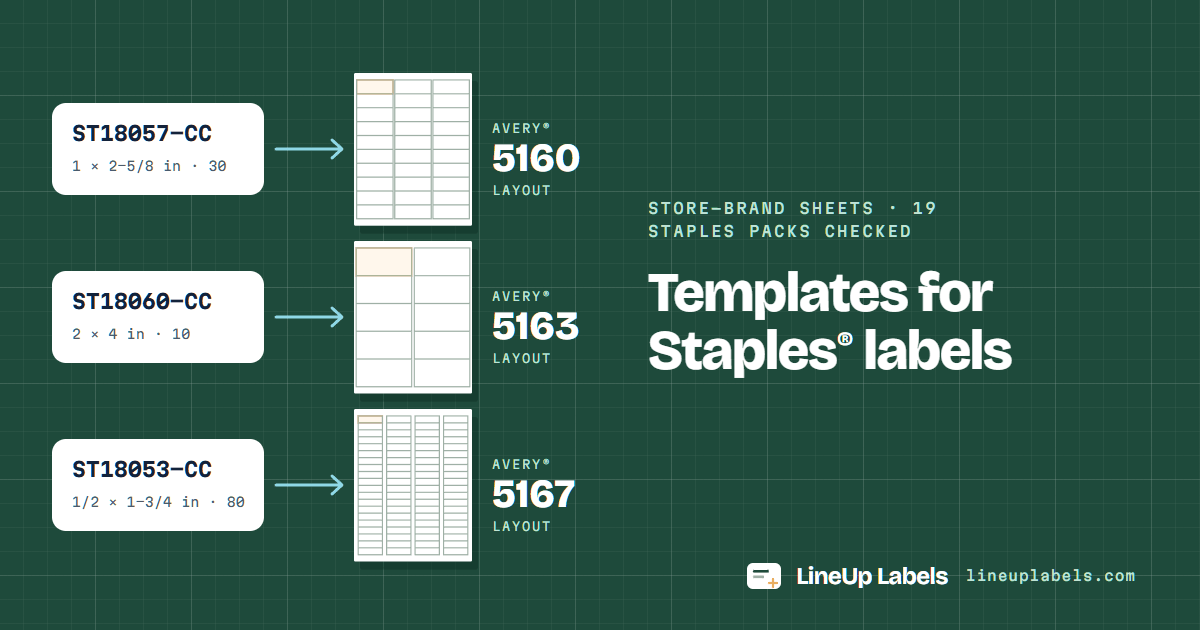
The Staples labels we checked are cut in Avery® layouts: the 1 × 2-5/8 in address labels, 30 per sheet (ST18054-CC, ST18057-CC and ST18063-CC), have the layout of Avery® 5160, the 2 × 4 in shipping labels that of 5163, and the 80-per-sheet return address labels that of 5167. Find your pack below by its item or model number, then fill the sheet from your list: no Word needed.
Staples lists an item number and a model number for each pack. Packs that share a layout share a card, a sheet drawn to scale and a template: only the count in the box differs. Every pack here is sold for laser and inkjet printers.
3 × 10
Address labels · 30 per sheet
1 × 2-5/8 in: the layout of Avery® 5160
ST18054-CCitem 479872 · white · 750 labels, 25 sheets
ST18057-CCitem 479880 · white · 3,000 labels, 100 sheets
ST18063-CCitem 479884 · white · 7,500 labels, 250 sheets
ST18053-CCitem 511509 · white · 2,000 labels, 25 sheets
ST18056-CCitem 573945 · white · 8,000 labels, 100 sheets
The Staples pages we read name no Avery number for these packs: the match rests on Staples' own templates.
Checked 2026-10-03 against Staples' own Word templates. ST18053-CC's has the same rows, columns and margins as Avery® 5167 (within 0.012 in). ST18056-CC's sets its columns 2.0625 in apart instead of 2.05 in, so a column lands at most 0.019 in from ours, under 1/32 in.
How we checked: we downloaded each pack's own Word template from its page at staples.com and measured its table on 2026-10-03, against Avery's own template files. Rows, column spacing and top margins match to the twip, the twentieth of a point Word works in, but for the columns of ST18056-CC (above); left edges are within 0.012 in, about the 0.01 in by which Word may set a table's edge apart from its margin. Quill, whose listings are quoted, is a Staples company.
Where the templates are
Staples' Word file, or a PDF from your list.
Both line up on the same sheet. What differs is where the addresses come from.
Staples' own template
On staples.com, each pack's page has a “Click here to download the template” link: a Word file made for that pack, as on the page for ST18057-CC.
Staples' instructions, one PDF for every pack, have you choose Avery US Letter in Word's label options.
You type each label into Word's table, or set up a mail merge from your list.
Here, with no Word
Paste your cells or open an Excel, CSV or contacts file: one label per row, ZIP codes kept whole (how a spreadsheet is read).
The PDF is made in your browser at the sheet's exact size, to print at 100% (Actual size).
Start at any label of a sheet you already used, or type one address once and fill the whole sheet.
Each template page has a blank PDF of its sheet, and calibration fixes a printer that prints a little off.
Same layout. ST18057-CC (item 479880) is 3,000 address labels on 100 sheets, 30 labels of 1 × 2-5/8 in to a sheet, in 3 columns of 10: the sheet of Avery® 5160. Quill's listing for it says “Compare to Avery 5160/8160”, and its own Word template, checked 2026-10-03, has 5160's rows, columns and margins. Use the template for Avery® 5160, or fill a sheet from your list.
Which template for Staples 2x4 shipping labels, 10 per sheet?
Avery® 5163's: 10 labels of 2 × 4 in to a sheet, in 2 columns of 5. Staples sells them as ST18060-CC, ST18066-CC and 18060CT, and its page for 18060CT says “Compare with Avery* model 5163 and 8163”. Paste your order list or open the spreadsheet in the editor: one label per row, on as many sheets as it takes.
Where can I download Staples label templates for free?
On staples.com: each pack's page has a “Click here to download the template” link to a Word file made for it, as on the page for ST18057-CC. Here there is nothing to download or install: pick the layout above, and the editor makes the PDF in your browser, free. Each template page also has a blank PDF of its sheet, to check the layout on plain paper.
Can I use a Staples label template in Word?
Yes. Staples' Word file is a table already set to the sheet: type into it, or use it for a mail merge. In Word's own label options, choose Avery US Letter and the Avery number on your pack's card above, 5160 for ST18057-CC (Microsoft's steps); Staples' instructions have you choose Avery US Letter too. Without Word, the editor fills every label from your spreadsheet.
Which template for Staples 18054 or 18063 labels?
Avery® 5160's, as for 18057: ST18054-CC is 750 labels on 25 sheets and ST18063-CC is 7,500 labels on 250 sheets, 30 labels of 1 × 2-5/8 in to a sheet, in 3 columns of 10. Their own Word templates have the same rows, columns and margins: use the template for Avery® 5160.
Which template fits the Staples 14-label sheet?
The sheet of 14 is 1-1/3 × 4 in address labels in 2 columns of 7: Staples ST18059-CC and ST18065-CC. Its layout is Avery® 5162's, whose first row starts 5/6 in from the top edge. Use the template for Avery® 5162.
Which template for Staples 1 x 4 labels?
Avery® 5161's: 20 labels of 1 × 4 in to a sheet, in 2 columns of 10. Staples sells them as ST18058-CC (2,000 labels) and ST18064-CC (5,000 labels), and Quill's listing for ST18058-CC says “Compare to Avery 5161/8161”. Use the template for Avery® 5161.
Which template for Staples return address labels, like Avery 5267?
Avery® 5167's, which Avery 5267 shares: 80 labels of 1/2 × 1-3/4 in to a sheet, in 4 columns of 20. Staples sells them as ST18053-CC (2,000 labels) and ST18056-CC (8,000 labels). The 8,000-label box's own template sets its columns 2.0625 in apart instead of 2.05 in: a column lands at most 0.019 in from ours, under 1/32 in. To print one return address on every label, type it once on the 5167 page.
Do clear Staples labels use the same template?
Yes, the layout of Avery® 5160: ST18086-CC, ST18088-CC and ST18081-CC are clear, 30 to a sheet, and Quill's listing for ST18086-CC says “Compare to Avery 5660/8660”, Avery's clear labels in the 5160 layout. On a dark or colored envelope, print in black and test one label first.
What about Avery 18160, 18163 or 18660?
Those are Avery's own numbers, not Staples': 18160 and 18660 share the layout of Avery® 5160, and 18163 that of 5163, so their templates here fit them: 5160 and 5163.
My Staples pack isn't listed. Which template fits it?
Measure one label and count the labels on a sheet: the card above with the same size and count is your layout. Then print the blank PDF from its template page on plain paper and hold it over a sheet against a window. We list only the packs whose own template we measured; tell us about another at hello@lineuplabels.com.
A whole list on Staples sheets?
Paste your spreadsheet or open a CSV or Excel file, then pick the Avery number from your pack's card: one label per row, on as many sheets as it takes.