In Excel
Make the ZIP column text
Do it before the ZIP codes go in: a zero Excel already dropped stays dropped, so retype those (Microsoft). Then save the workbook and merge again (Microsoft Learn, method 2; the Mac's Format box).
Word mail merge · Excel formats
Updated
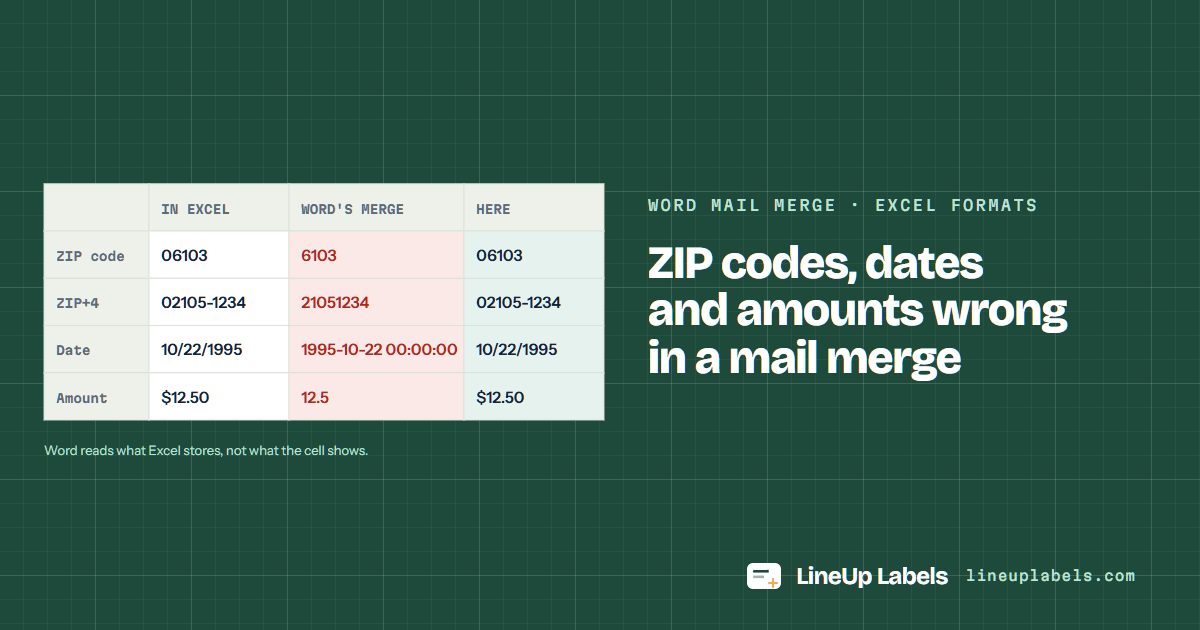
Word's merge reads what Excel stores, not what the cell shows: 06103 arrives as 6103, $12.50 as 12.5 and 50% as .5. Make the ZIP column text in Excel, add a switch to a date or amount field in Word, or connect the workbook another way. Or open the workbook here: each cell prints as Excel shows it.
How the Excel columns become lines
Stored, not shown
Microsoft's explanation: the recipient list shows "the native format in which Excel stores" the data, without the cell's formatting (Microsoft Learn). The Word column is Microsoft's own example for each kind of cell.
| Cell | Excel shows | Word's merge gives | Fix in Word | Here |
|---|---|---|---|---|
| ZIP code | 06103 | 6103 Microsoft | \# 00000 (five-digit ZIP codes only) | 06103 |
| ZIP+4 | 02105-1234 | 21051234 Microsoft | Format the column as Text in Excel | 02105-1234 |
| Date | 10/22/1995 | 1995-10-22 00:00:00 Microsoft | \@ "MMMM d, yyyy" | 10/22/1995 |
| Amount | $12.50 | 12.5 Microsoft | \# $,0.00 | $12.50 |
| Percent | 50% | .5 Microsoft | Connect by DDE (Windows) | 50% |
{ MERGEFIELD Renewal \@ "MMMM d, yyyy" } prints October 22, 1995. The M of the month is a capital; a small m means minutes (Microsoft's switches).One in Excel, for ZIP codes, on Windows and Mac; one in Word on Windows, for every format at once.
In Excel
Do it before the ZIP codes go in: a zero Excel already dropped stays dropped, so retype those (Microsoft). Then save the workbook and merge again (Microsoft Learn, method 2; the Mac's Format box).
In Word for Windows
Microsoft says the list then shows "the same formatting that appears in the Excel worksheet" (Microsoft Learn, method 1). Its steps are for Word on Windows.
Do it here
Paste the cells or open the .xlsx. A US ZIP code that lost its leading zero gets it back from the state, and a ZIP+4 stored as eight digits prints with its hyphen.
Worked example
The cells as the spreadsheet lost them, and the labels as the post office reads them.
| Row | Name | Street | City | State | ZIP | Renewal | Dues |
|---|---|---|---|---|---|---|---|
| 2 | Abigail Thornton | 14 Linden St | Cambridge | MA | 2139 | 10/31/2026 | $45.00 |
| 3 | Rafael Medina | 302 Washington St | Hoboken | NJ | 7030 | 11/15/2026 | $45.00 |
| 4 | Corinne Dubois | 58 Wooster Sq | New Haven | CT | 6511 | 12/1/2026 | $60.00 |
| 6 | Yusuf Adeyemi | 260 Tremont St | Boston | MA | 21161234 | 10/31/2026 | $45.00 |
The .xlsx as it is: each cell is read with its own number format, so a ZIP code formatted 00000 keeps its zeros.
A five-digit US ZIP code that lost its zero, or a ZIP+4 stored as eight digits, is put back from the state on the same row.
Print at 100% on plain paper first. The list itself is never uploaded or changed.
The same numbers Word lists under Avery US Letter, with their sizes from Avery's own template files.
| Sheet | Label size | Per sheet | Same layout | Good for |
|---|---|---|---|---|
| Avery® 5160 | 1 × 2-5/8 in | 30 | 8160 · 9160 · 18160 +56 | Name, street and city with its ZIP code, 30 to a sheet. |
| Avery® 5161 | 1 × 4 in | 20 | 8161 · 5261 · 5909 +19 | A long name or a second street line, 4 in wide. |
| Avery® 5163 | 2 × 4 in | 10 | 8163 · 18163 · 48163 +29 | Dues reminders mailed in large envelopes. |
"Fit to page" can resize the sheet, and then the lower rows drift off their labels. The PDF opens at 100%; keep it there.
Printers differ: some print on the side facing up in the tray, others on the side facing down. Mark an X on a plain sheet, print once and look before you load labels.
Hold a plain-paper print over a 5161 sheet against a window. If it sits off, calibrate once and save the correction for that printer.
Add a date switch to the field: { MERGEFIELD Renewal \@ "MMMM d, yyyy" } prints October 31, 2026. Show the field codes with Alt+F9 (Option+F9 on a Mac) to edit it (each format).
Excel stores $12.50 as 12.5 and the merge takes that. A numeric switch, \# $,0.00, puts the sign and the cents back (Microsoft's switches).
Another way for Word on Windows to read the workbook, which Microsoft says keeps the formatting the worksheet shows. You turn on Confirm file format conversion on open and pick MS Excel Worksheets via DDE (the steps).
The Text format in Excel and the field switches do: Option+F9 shows the codes. Microsoft gives the DDE steps for Word on Windows.
Yes. Typed as 02116-1234 it prints as typed; stored as 21161234, with a US state on its row, it prints as 02116-1234.
The editor reads each cell with its format, puts back lost ZIP code zeros, and lets you add the renewal date to a line.