Print at actual size
"Fit to page" can resize the sheet, and then the lower rows drift off their labels. The PDF opens at 100%; keep it there.
Word mail merge · alignment
Updated
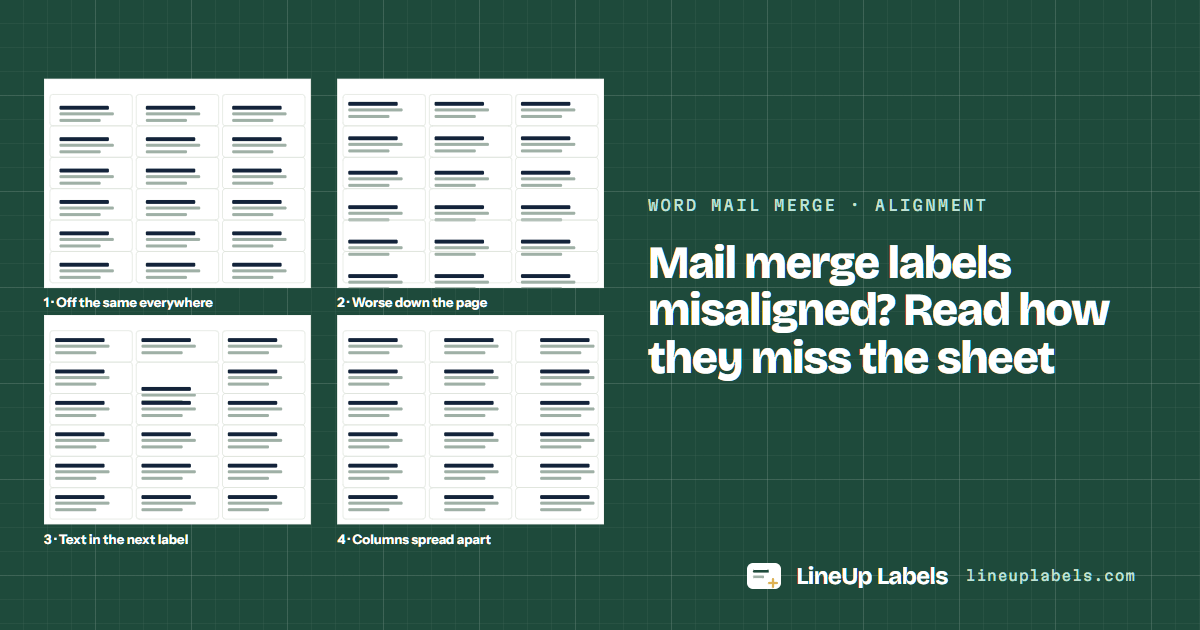
How the print misses tells you why. Off by the same amount on every label is the printer; worse down the page is the product number, the scale or the paper size; text in the next label is too much text. Match your sheet below, or print the list here at the size of the sheet and correct the printer once.
Off the same everywhere? Calibrate the printer
The way the print misses tells the cause. On 8663 and 5163, for instance, the second column of one sits 1/32 in from where the other puts it, from the same 2 × 4 in labels.
Pattern 1 · you see
The document is right and the printer places the page a little off: every printer feeds the sheet its own way.
Pattern 2 · you see
The rows in Word aren't the rows of your sheet: another product number, a page scaled to fit, or paper that isn't US Letter.
Microsoft: Avery US Letter · Microsoft: Word for Mac · Microsoft: Paper tab
Pattern 3 · you see
More lines than the label holds, a larger font or extra paragraph spacing push the text past its cell.
Pattern 4 · you see
Two sheets can have the same label size in different places: 8663 and 5163 are both 2 × 4 in, and their columns don't line up.
Do it here
Paste the orders you were merging, or open the file. Every label is placed where Avery's template puts it, and a long address shrinks before it spills.
Worked example
Company, street and suite on their own lines, the city line whole, on 5163's 2 × 4 in labels.
| Row | Name | Company | Address 1 | Address 2 | City | State | ZIP |
|---|---|---|---|---|---|---|---|
| 2 | Imani Brooks | Brooks Ceramics | 2200 Industrial Pkwy | Unit 14 | Sacramento | CA | 95815 |
| 4 | Mara Jensen | Northwind Yarn Co. | 1188 Lake Shore Dr | Building C Suite 300 | Madison | WI | 53703 |
| 7 | Dev Kapoor | 2901 Prairie View Blvd | Apt 1207 | Omaha | NE | 68132 |
Plain paper, at 100%. Or the calibration test sheet, with rulers in 1/32 in steps.
Against a window. Note which way the print sits, and whether it gets worse down the page.
The same everywhere: save a printer correction. Worse down the page: the product number, the scale or the paper size.
Labels of one size can sit in different places on the sheet. Pick by the number on the box, never by the size alone.
| Sheet | Label size | Per sheet | Same layout | Good for |
|---|---|---|---|---|
| Avery® 5163 | 2 × 4 in | 10 | 8163 · 18163 · 48163 +29 | 2 × 4 in, columns 4-3/16 in apart. |
| Avery® 8663 | 2 × 4 in | 10 | 5663 · 7663 · 15663 +2 | 2 × 4 in clear labels, columns 4-1/8 in apart. |
| Avery® 5160 | 1 × 2-5/8 in | 30 | 8160 · 9160 · 18160 +56 | Address labels, 30 to a sheet, the rows touching. |
Before the text spills
Lines of Helvetica a label holds inside its padding, as this site's PDF sets them, at the size each sheet starts at and two points smaller. Word sets its own line and paragraph spacing, so read these as the most a label holds.
| Sheet | Label | Lines | Characters a line |
|---|---|---|---|
| 5160 | 1 in tall | 5 at 10 pt · 6 at 8 pt | 36 at 10 pt |
| 5161 | 1 in tall | 4 at 12 pt · 5 at 10 pt | 48 at 12 pt |
| 5162 | 1-1/3 in tall | 6 at 12 pt · 7 at 10 pt | 48 at 12 pt |
| 5163 | 2 in tall | 8 at 14 pt · 9 at 12 pt | 41 at 14 pt |
| 5164 | 3-1/3 in tall | 12 at 16 pt · 13 at 14 pt | 36 at 16 pt |
| 5167 | 1/2 in tall | 3 at 7 pt · 4 at 5 pt | 31 at 7 pt |
| 8257 | 3/4 in tall | 4 at 9 pt · 5 at 7 pt | 34 at 9 pt |
| 6871 | 1-1/4 in tall | 6 at 10 pt · 8 at 8 pt | 31 at 10 pt |
"Fit to page" can resize the sheet, and then the lower rows drift off their labels. The PDF opens at 100%; keep it there.
Printers differ: some print on the side facing up in the tray, others on the side facing down. Mark an X on a plain sheet, print once and look before you load labels.
Hold a plain-paper print over a 5163 sheet against a window. If it sits off, calibrate once and save the correction for that printer.
The rows in Word don't match your sheet: another product number in Label Options, a page scaled to fit, or paper that isn't Letter (pattern 2).
That's the printer, not the document: each feeds the sheet a little differently. Print the test sheet, measure, and save the correction for that printer (pattern 1).
The label holds fewer lines than the address has, at that size. Shorten it, use a smaller font, or remove paragraph spacing on the first label, then Update Labels (how many lines each sheet holds).
No: Fit to page can shrink the sheet, and the rows drift further off the lower they are. Print at 100%, Actual size.
Print the calibration test sheet once, read the offset on its rulers and save it: every PDF this site makes for that printer carries the correction (calibration).
The editor places every label to a thousandth of a point, carries your printer's correction and starts on any label of a used sheet.