Google Docs · Avery 5160 and 8160

How to make Avery 5160 labels in Google Docs, without an add-on

Updated

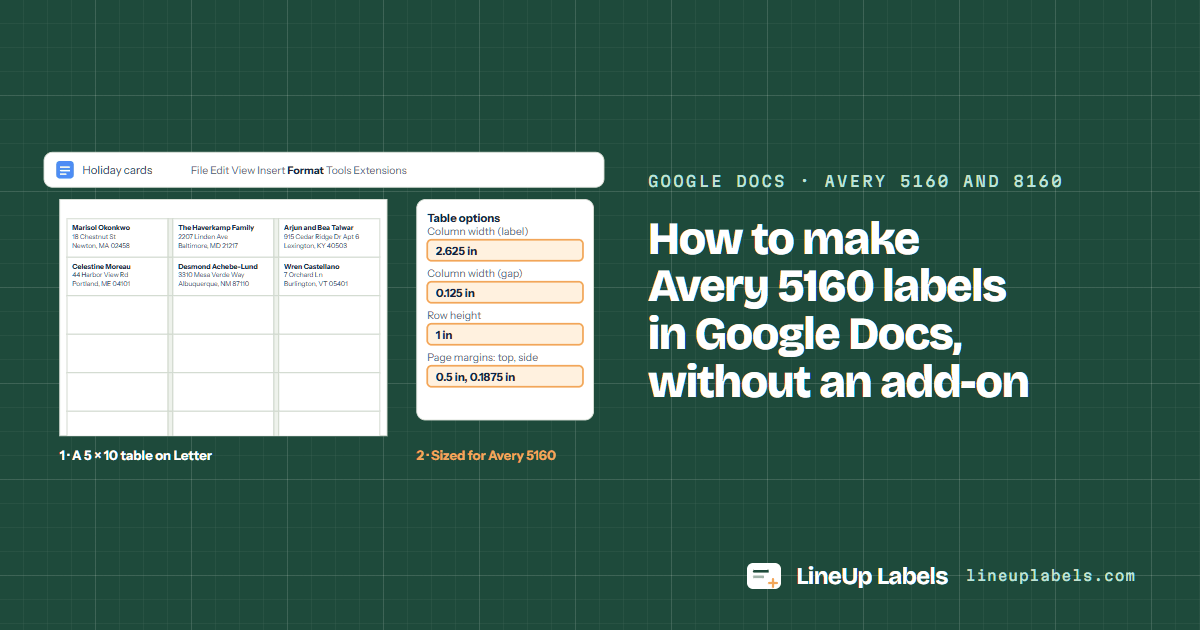
In Google Docs a sheet of labels is a table you size yourself. For Avery® 5160: File > Page setup on Letter with 0.5 in margins at the top and bottom and 0.1875 in at the sides, then a 5 × 10 table whose columns are 2.625, 0.125, 2.625, 0.125, 2.625 in wide and whose rows are 1 in high. Or paste the addresses from your Doc here and download a PDF already laid out for the sheet.

  • No add-on, no access asked
  • Sizes from Avery's own files
  • Works on a Chromebook
Holiday cards File Edit View Insert Format Tools Extensions Marisol Okonkwo18 Chestnut StNewton, MA 02458The Haverkamp Family2207 Linden AveBaltimore, MD 21217Arjun and Bea Talwar915 Cedar Ridge Dr Apt 6Lexington, KY 40503Celestine Moreau44 Harbor View RdPortland, ME 04101Desmond Achebe-Lund3310 Mesa Verde WayAlbuquerque, NM 87110Wren Castellano7 Orchard LnBurlington, VT 05401 Table options Column width (label)2.625 in Column width (gap)0.125 in Row height1 in Page margins: top, side0.5 in, 0.1875 in 1 · A 5 × 10 table on Letter 2 · Sized for Avery 5160

Table · add-on · paste

Three ways, side by side.

Google's menus, from its Docs Editors Help, read on November 11, 2026.

Three ways to a sheet of labels from Google Docs: a table in docs, an add-on or paste them here. Google's own mail merge lives in Gmail and sends emails, on some paid Workspace plans (Google's page).

Three ways to make a sheet of labels from Google Docs
WayHowBest for
A table in DocsFile > Page setup for the margins (Google's steps), Insert > Table, then Format > Table > Table options for each column's width and the rows' height (Google's steps). The sizes for each sheet.A few labels typed by hand, or the same label on every spot.
An add-onExtensions > Add-ons > Get add-ons. Most ask to see data the add-on needs before they work (Google's note).A merge from a Google Sheet, if you're fine giving an add-on that access.
Paste them hereCopy the address blocks from your Doc, or the cells from Google Sheets, and paste them above. The PDF comes out at the sheet's own size.A list of any length, a sheet already half used, nothing to install or allow.

Do it here

Paste the addresses from your Doc.

Copy the address blocks from the document, a blank line between two, and paste them. Each block becomes a label, line for line. Cells copied from Google Sheets paste too.

Cells copied from Excel, Google Sheets or Numbers, header row included, or addresses with a blank line between them.

The number on your box

Open the full editor

The sheet shows the sample: six address blocks, as a Google Doc holds them. Paste your list or open a file, and it shows yours.

Your list stays on this device. Nothing is uploaded.

Marisol Okonkwo18 Chestnut StNewton, MA 02458The Haverkamp Family2207 Linden AveBaltimore, MD 21217Arjun and Bea Talwar915 Cedar Ridge Dr Apt 6Lexington, KY 40503Celestine Moreau44 Harbor View RdPortland, ME 04101Desmond Achebe-Lund3310 Mesa Verde WayAlbuquerque, NM 87110Wren Castellano7 Orchard LnBurlington, VT 05401
Sample list · 6 labels on 5160

Worked example

Six addresses from a Doc, six labels.

The blocks as they sit in the document, a blank line between two, and the sheet they make when pasted above.

In the Google Doc

On a sheet of Avery 5160

Marisol Okonkwo18 Chestnut StNewton, MA 02458The Haverkamp Family2207 Linden AveBaltimore, MD 21217Arjun and Bea Talwar915 Cedar Ridge Dr Apt 6Lexington, KY 40503Celestine Moreau44 Harbor View RdPortland, ME 04101Desmond Achebe-Lund3310 Mesa Verde WayAlbuquerque, NM 87110Wren Castellano7 Orchard LnBurlington, VT 05401
  • 6 blocks, 6 labels: each block's lines stay as typed, the first in bold.
  • 24 labels left on the sheet. Next time, set Start at label to 7.
  • The apartment stays on the street line, as it was in the Doc.

From a Google Doc to a sheet of labels in four steps.

  1. Copy the addresses

    In the Doc, select the address blocks and copy them with Ctrl+C (⌘C on a Mac). Keep a blank line between two addresses.

  2. Paste them above

    Each block becomes one label. The sheet beside the box shows them where they print.

  3. Pick the number on your box

    5160, 8160 and the other numbers with the same layout are one choice. Set Start at label if the sheet has labels missing.

  4. Download and print at 100%

    Open the PDF and print it at its own size, not scaled to fit. On a Chromebook, Ctrl + P opens the print window (Google's steps).

Sheets for a list from Docs

Sizes from Avery's own template files, the same ones the table above is worked out from.

Sheets for a list from Docs: size, labels per sheet and the numbers that share each layout
SheetLabel sizePer sheetSame layoutGood for
Avery® 5160 1 × 2-5/8 in 30 8160 · 9160 · 18160 +56 Most addresses: 30 to a sheet, three lines at 10 pt.
Avery® 5161 1 × 4 in 20 8161 · 5261 · 5909 +19 Long names and streets: 20 labels 4 in wide.
Avery® 5163 2 × 4 in 10 8163 · 18163 · 48163 +29 Parcels and big envelopes: 10 labels of 2 × 4 in.

The table, by hand

A Docs table that matches the sheet.

Each label is a cell, with a narrow empty column between two labels for the gap on the sheet. Sizes from Avery's own template files.

The page margins and table sizes that lay out three Avery sheets in Google Docs
SettingAvery 5160 · 30 a sheetAvery 5161 · 20 a sheetAvery 5163 · 10 a sheet
Page marginsTop 0.5, bottom 0.5, left 0.1875, right 0.1875 inTop 0.5, bottom 0.5, left 0.1667, right 0.1458 inTop 0.5, bottom 0.5, left 0.1563, right 0.1563 in
Table5 columns × 10 rows3 columns × 10 rows3 columns × 5 rows
Column widths2.625, 0.125, 2.625, 0.125, 2.625 in4, 0.1875, 4 in4, 0.1875, 4 in
Row height1 in1 in2 in
  1. Page setup. File > Page setup, then Pages at the top: Letter, portrait, and the margins above. The document must be in pages format, not pageless (Google's steps).
  2. Insert the table. Insert > Table, with the columns and rows above; a Docs table goes up to 20 × 20 cells (Google's steps).
  3. Size it. Select the label columns, then Format > Table > Table options and type the width; then the gap columns; then every row's height. Under Cell, set the padding and the vertical alignment (Google's steps).
  4. Hide the lines. With the table selected, set Border width to 0 pt in the toolbar (Google's steps).
  5. Type the labels, and keep each one short. A line too many makes its row taller, and every label under it moves down the sheet.
  6. Print a test on plain paper. Hold it against a sheet of labels to the light before you print on the labels.

In Avery's template files, 5160 shares its layout with 59 other numbers, 8160 and 5260 among them: the same table fits them all.

Three things that keep 5160 labels straight.

Print at actual size

"Fit to page" can resize the sheet, and then the lower rows drift off their labels. The PDF opens at 100%; keep it there.

Feed the right side up

Printers differ: some print on the side facing up in the tray, others on the side facing down. Mark an X on a plain sheet, print once and look before you load labels.

Test on plain paper

Hold a plain-paper print over a 5160 sheet against a window. If it sits off, calibrate once and save the correction for that printer.

Questions people ask

Is there a template for Avery 5160 labels in Google Docs?

You can make one: a 5 × 10 table on Letter, with the margins and sizes in the table above, worked out from Avery's own template file. Or skip the table: paste the addresses above and download a PDF for 5160.

How do I make labels in Google Docs without an add-on?

With a table: File > Page setup for the margins, Insert > Table, then Format > Table > Table options for the widths and the row height (Google's steps). Type each label in its cell and leave the narrow columns empty.

Do Avery 8160 labels take the same table in Google Docs?

Yes. In Avery's template files 8160 has the same layout as 5160, so the same table and the same PDF fit it.

Can you do a mail merge for labels in Google Docs?

Google's mail merge is in Gmail and sends personalized emails, on some paid Workspace plans (Google's page). For labels, an add-on can merge from a Sheet, after you allow it to see the data it needs (Google's note). Or paste the list here: every block or row becomes a label.

Why do my labels drift down the page in Docs?

A row grows when its text needs more room, and every row under it moves down. Keep each label to the lines that fit, check the page margins, and print at 100%, never scaled to fit.

Does this page see my Google Docs?

No. It reads only what you paste, in your browser, and makes the PDF there too. Nothing is uploaded or stored, and there is no add-on asking to see your files.

A long list, kept in order.

The editor takes the same paste and does more: sort by last name or ZIP code, leave out duplicates, change the lines, print copies.

A Google Doc on Letter paper with a table laid out for Avery 5160 address labels, and the Table options panel with the column widths and row height