Open it in Word
In Protected View, choose Enable Editing. Table Layout > View Gridlines (Microsoft's steps) outlines the 32 labels on screen; the lines never print.
Rectangle labels · 32 per sheet
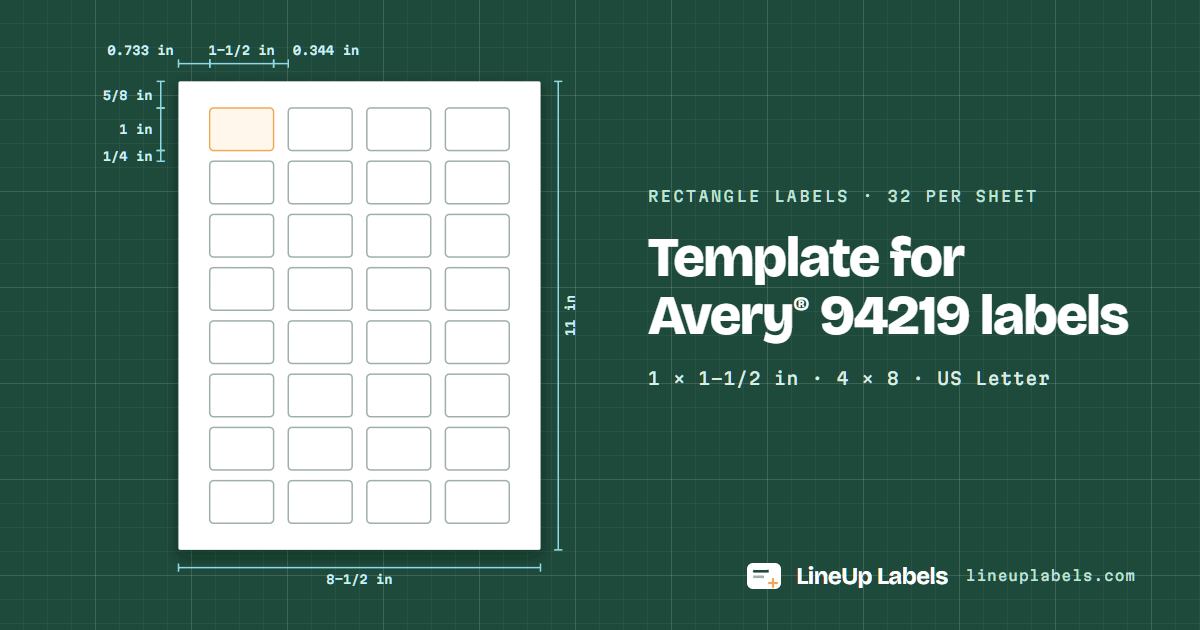
Avery® 94219 is a sheet of 32 rectangle labels, 1 × 1-1/2 in, in 4 columns of 8; Avery lists no other number with its layout. The first label starts 5/8 in from the top edge and 0.733 in from the left edge; columns are 0.344 in apart and rows are 1/4 in apart. The blank template comes as a PDF and as a Word file (.docx).
The blank PDF has every label's outline, for checking the layout on plain paper.
Avery 94219 · 32 per sheet · drawn to scale
Try it here
The same text on every label of the sheet. For a list of different labels, open the editor and paste your spreadsheet.
Specifications
Checked against Avery's own template for 94219. The PDF places every label at these positions to a thousandth of a point, so the only thing left to tune is your printer.
| Label width | 1-1/2 in |
|---|---|
| Label height | 1 in |
| Labels per sheet | 32 4 across, 8 down |
| Sheet | US Letter, 8-1/2 × 11 in |
| Top margin | 5/8 in to the first row |
| Bottom margin | 5/8 in below the last row |
| Left margin | 0.733 in to the first column |
| Right margin | 0.733 in after the last column |
| Space between columns | 0.344 in |
| Space between rows | 1/4 in |
| Column pitch | 1.844 in left edge to left edge |
| Row pitch | 1-1/4 in top edge to top edge |
| Corner radius | 3/32 in |
One table on a US Letter page, starting 5/8 in from the top and 0.733 in from the left: a cell for each of the 32 labels (1 × 1-1/2 in), with 0.344 in spacer columns and 1/4 in spacer rows for the gaps. Saved as PDF from Word, every cell sits within 0.1 pt of where this page's PDF prints the label.
In Protected View, choose Enable Editing. Table Layout > View Gridlines (Microsoft's steps) outlines the 32 labels on screen; the lines never print.
Click in a label and type: 9 pt Arial, centered. Skip the spacer cells. Rows are fixed at 1 in, so text that runs past the bottom of a label is cut off.
Mailings > Labels does it without this file: Full page of the same label, then Options, Avery US Letter, 94219 if listed (Microsoft's steps). From a spreadsheet, use the editor.
Test on plain paper over a 94219 sheet first.
1 × 1-1/2 in · 32 per sheet
Avery® 94219 is a sheet of 32 rectangle labels, 1 × 1-1/2 in, in 4 columns of 8; Avery lists no other number with its layout.
| Size | Lines | Characters on a line |
|---|---|---|
| 7 pt | 7 | 25 |
| 9 pt where it starts | 5 | 20 |
| 11 pt | 4 | 15 |
| Labels | Sheets | Left blank |
|---|---|---|
| 25 | 1 | 7 |
| 50 | 2 | 14 |
| 100 | 4 | 28 |
| 250 | 8 | 6 |
| 500 | 16 | 12 |
The 32 labels of 94219 cover 51% of the sheet; the other 49% is margin and the paper between them.
"Fit to page" can resize the sheet, and then the lower rows drift off their labels. The PDF opens at 100%; keep it there.
94219 is an Avery Presta® number: Avery sells its 32 labels of 1 × 1-1/2 in in many materials. Your box says which; set the print dialog for labels, glossy or film to match.
Columns 0.344 in and rows 1/4 in apart: a print a little off lands on the paper between labels first. If it reaches a cut, calibrate once.
1-1/2 in wide and 1 in tall, 32 per US Letter sheet in 4 columns and 8 rows.
Top 5/8 in, bottom 5/8 in, left 0.733 in and right 0.733 in; columns are 0.344 in apart and rows are 1/4 in apart.
In Word, yes: the Word file here is the 94219 sheet as a table to type in (how to use it). Word can also lay out the sheet itself: go to Mailings > Labels > Options, choose Avery US Letter under Label vendors, then 94219 as the product number (Microsoft's steps); on a Mac, an Avery option under Label products, then 94219 (Word for Mac). If it isn't listed, New Label takes the measurements above (custom labels). If a mail merge then fills only the first label or prints off the sheet, the mail merge fixes show what to change. Google Docs has no label sheets built in. Canva is made for designs; for a list of addresses, the editor fills every label from your spreadsheet.
Yes. Set "Start at label" to the first unused label: label 1 is the top left, and the count runs across each row. The labels before it stay blank.
Check that the print dialog says 100% (Actual size), not "Fit to page". If the print still sits a little off, print the test sheet on the calibration page and save a correction for your printer.
Paste your spreadsheet or open a CSV or Excel file: one label per row, on as many 94219 sheets as it takes.